

With Microsoft Flight Simulator 2024 set to launch on November 19th, a big question is on everyone’s mind: Should you upgrade your PC now or wait? As someone deeply involved in VR flight simulation, and having tested the tech alpha and preview versions at Microsoft’s World Preview Event, I’ve got some insights to share.

The Quick Answer: Hold Off for Now!
Let me give you the bottom line upfront: don’t rush into an upgrade just yet. Microsoft has revamped the simulator engine, bringing some impressive changes like improved performance, memory management, and visuals. But before you hit that “Buy Now” button on a new GPU or extra RAM, there are a few key points to consider.

Performance Improvements and What They Mean for You
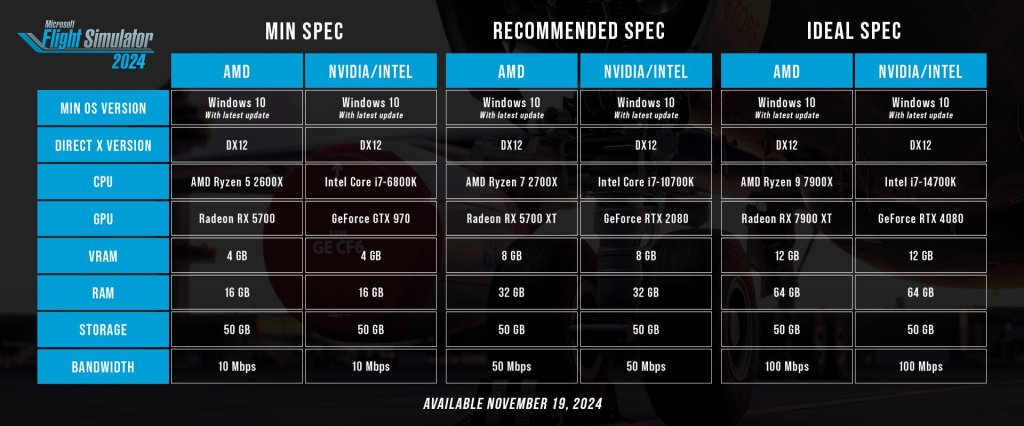
I had the chance to experience the new sim, and I can confidently say it’s not just about eye candy this time. Microsoft Flight Simulator 2024 introduces faster load times thanks to a more efficient client setup. Smaller downloads and cloud gaming integration mean you’ll need decent internet, but most of you with stable connections should be fine. Just be cautious if you’re running on slower speeds or heavy data caps—you’ll want at least 50 Mbps for a smoother experience.
On the graphics side, Microsoft made noticeable improvements in lighting and shadow rendering. Even without full RTX coverage, the revamped lighting system looks more immersive than ever. Clouds now interact more realistically, creating a more lifelike flying environment. These visual upgrades make the overall experience feel richer, but that doesn’t mean you need to upgrade your entire system today.
Ideal Specs for VR and Why You Should Wait
Now let’s talk hardware requirements. If you’re into VR like me, you probably already know how demanding it can be on your setup. Microsoft didn’t provide a specific “VR spec” recommendation, but based on my experience, the ideal specs should be your goal if you want to run VR smoothly. For example, something like an Intel 14700K with an RTX 4070 Ti or higher is a solid starting point for VR, but anything less might struggle.
Seb from Microsoft hinted that while 32GB of RAM is plenty for pure simming, 64GB might be a good investment if you’re planning to create content or multitask. I’ve personally maxed out my 32GB of RAM while recording gameplay in DCS World, so upgrading could be beneficial for heavy-duty users and I plan to upgrade soon.

Upcoming GPU Releases: Hold On to Your Wallets
Here’s another reason why I suggest waiting: Nvidia’s 5000 series GPUs are around the corner. With the impending release, there’s bound to be a wave of people selling their current-gen GPUs like the 4090 or 4080. Even if you don’t plan on buying a 5000 series card, you can snag a great deal on used hardware in the near future. And for those worried about second-hand purchases—unlike the crypto mining boom of years past, GPUs on the used market are less likely to be heavily abused.
If you’re thinking of upgrading soon, wait for Black Friday deals or those post-launch comparisons. When the new GPUs drop, prices for current-gen hardware will likely drop as well. Why pay full price now if you can get the same or better in just a few weeks?

Multi-Threaded Support and the Future of Performance
One of the most exciting changes in the upcoming sim is multi-threaded CPU support. This means the sim will better utilize the cores and threads on modern CPUs, offering smoother gameplay and improved overall performance. Whether you’re on an Intel or AMD platform, expect a more balanced workload distribution across those cores, giving VR users like us every last ounce of performance boost we crave.
Final Tips Before You Upgrade
Here are my top three tips:
- Wait and Watch: Before upgrading, wait until Microsoft Flight Simulator 2024 launches and see real-world comparisons. Join my Discord or Facebook group to discuss and compare performance with other simmers.
- Black Friday Is Coming: Use this downtime to scope out deals and plan your next hardware upgrade. There’s no need to pay full price when discounts are just around the corner.
- Keep an Eye on Used Hardware: When the 5000 series GPUs launch, the second-hand market will heat up. It’s a great opportunity to grab a powerful card at a reasonable price, just make sure to shop smart.

Wrapping Up
So, should you upgrade your PC today? In my opinion, hold off and wait for the new sim to launch. Take the time to observe how others with similar setups are faring. If you can get your hands on some solid second-hand hardware or a great Black Friday deal, that might be the way to go.
Personally, I’m holding on to my RTX 4090 and looking forward to seeing what the 5000 series brings. My plan is to eventually transition my current PC into an editing rig and build a dedicated sim rig when the time is right.
Lastly, let’s not forget about the importance of VR. I’m currently using the Pimax Crystal Light, which will be Officially Supported for Microsoft Flight Simulator 2024 and I fully support it.
Stay tuned, as I’ll be dropping a video soon on my full VR setup and how to maximize your hardware’s potential.

If you found this post helpful, feel free to join the conversation on my social channels or check out my latest videos. Let’s fly into 2024 together—smoothly and smartly.
Clear Skies and Tail Winds ✈️



 Elevate your VR Experience!
Leave a comment